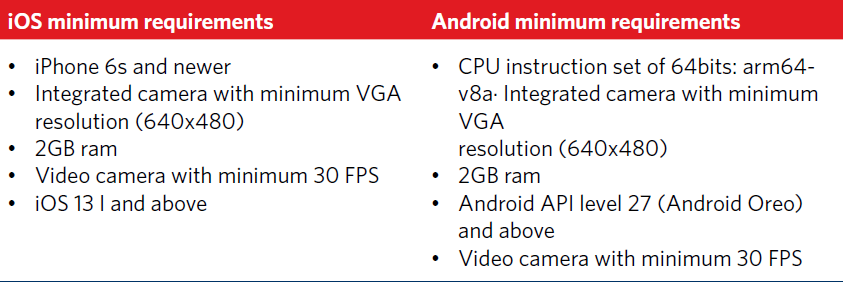
Most smartphones are supported. In general, all that is needed is a smartphone with a camera, but it does get technical. The guideline below will give an indication of the minimum requirements:
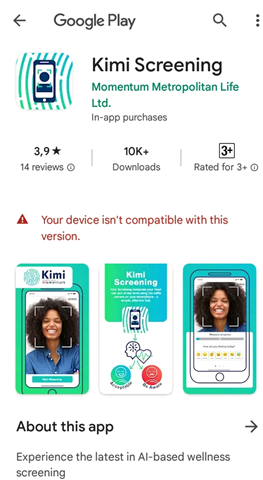
Note: If clients cannot open the link for screening it may mean that their phone is not compatible with the app. The link will take them to their app store, which will indicate that their device is not compatible, as shown in the image below.
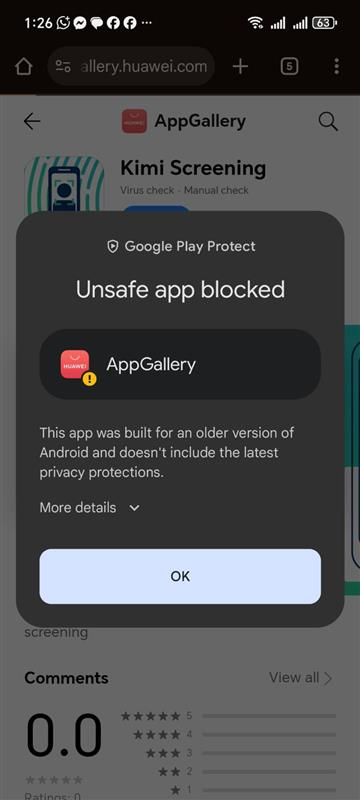
If a client has a Huawei Honor phone, they follow this process:
- Honor, requires the client to download the KIMI app from their Huawei Gallery store and then click on the link.
- Click 'ok'
- Proceed to the screen.
If clients are not sure if their smartphone meets the minimum requirements above, they can check online at: https://browser.geekbench.com/android-benchmarks. All devices scoring higher than 300 are compatible for screening.
Important: Do not mistakenly download the Kimi Tracking app—a companion app—that requires a subscription and uses a wearable health tracker.
The following options are available if a client’s smartphone is not compatible with the screening app:
- Use an alternative smartphone
- The client can use a second smartphone (their own or a family member's) to complete the screening.
- Request assistance from the financial adviser
- We can arrange for their financial adviser to help them with the adviser's device.
- Visit the nearest Momentum office
- The client may contact the Momentum contact centre, which will locate the closest branch. We will check device compatibility before their visit, and staff will assist the client through the screening process upon arrival.